Polarr Pro v6.11.7 Download for Android (Latest)
 Share
Share  Embed
Embed 


-
![]() 171
171 -
![]() 6
6 -
![]() 0
0
 171
171  6
6 

Downloading not started? Refresh page
FAQ'S
Open Google Play app > Click Profile Icon > Select Play Protect -> Setting > Turn off both "Scan apps with Play Protect" and "Improve harmful app detection" options.
Do you want an image editor where you can get all the necessary photo editing tools in one place? Polarr Pro apk provides all essential image tools where you can create a perfect image for your socials. This app has been used by more than 15 million users. Face tools, filters and colour masks work accurately. You don’t need to be a pro editor to use this app.
If you have no idea on how to edit, then you can check out the Polarr Pro previews section. Previews allow you to edit images automatically with one click. Don’t forget to give permission to open the image gallery for editing. This app is safe to use. You can choose an image to edit and run the preview over it for classy edits. To use this app, you don’t have to signup.
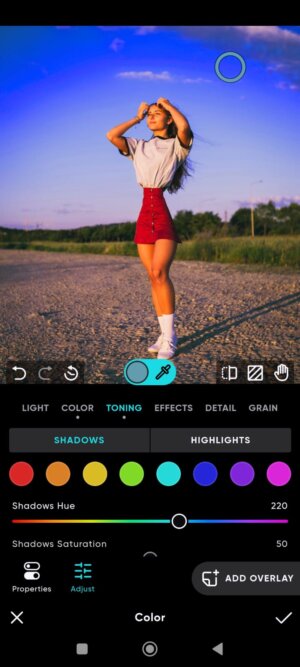
You can export the image in high quality from Polarr Pro App. If you are new to editing, you can choose overlays that provide various edits to your image. Now you can edit your images faster and easier with Polarr Pro apk.
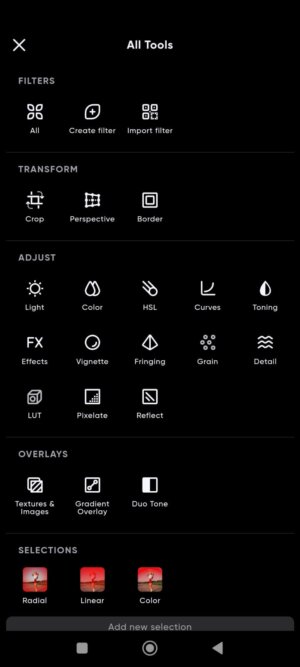
Key Features of Polarr Pro Apk:
With a vast variety of filters, previews and editing tools, this is one of the most user-friendly Image editing apps. Read about Polarr Pro apk features in brief below:
- Create Filters: There are more than 100+ filters available in the Polarr Pro app. You can also create filters and save them to use later. Users can also import filters of others when they signup into this app.
- Overlays: There are many overlays, such as Sky, Weather, Clouds, Leaks, Flares, Backdrops, Texture and much more. All overlays can be edited with opacity and other ratios. You can also set gradient overlays and edit their properties.
- Previews: This is a pre-edited filter by Polarr Pro and other editors. With the help of Previews, you can easily edit your images with one click. Previews can be very helpful if you want your to image to be edited within a minute.
- Colour masks: You can choose the colour or objects separately and change their colour according to your choice. The colour masks can be easily edited both on the overall image as well as separate parts of an image.
- Adjustments: You can adjust the minor edits of images such as hue, brightness, colour, light, grain, curves, pixelate, vignette, etc. These adjustments can be changed for separate parts as well as the whole image in Polarr Pro App.
- Retouch: Face retouching can be done easily when this app detects the face in the image. Changes in eyes, teeth, wrinkles, skin tone, and much more can be changed in this app.
- Pro features Unlocked: This is a mod app where you get all features unlocked and no watermark when you download images after editing from Polarr Pro apk.
Conclusion:
Polarr Pro has all the necessary editing tools anyone needs. You can easily create amazing image editing with this app. there are presets that acts as a filter for your image. Once you put your image to edit, Polarr Pro will provide 100+ edits to choose from within a second. Download Polarr Pro and create eye-catching photo edits effortlessly.

Other versions:

App Gallery


3.webp)

4.webp)






1.webp)

7.webp)





9.webp)



1.webp)



9.webp)


9.webp)