
Dual Space - Multiple Accounts v5.0.3 Download for Android (Latest)
 Share
Share  Embed
Embed 


-
![]() 239
239 -
![]() 6
6 -
![]() 0
0
 239
239  6
6 

Downloading not started? Refresh page
FAQ'S
Open Google Play app > Click Profile Icon > Select Play Protect -> Setting > Turn off both "Scan apps with Play Protect" and "Improve harmful app detection" options.
Dual Space Apk allows you to create a private space on your device to clone the installed apps and register a new account. You can install two WhatsApp accounts on one device or use the clones to open multiple accounts simultaneously. It’s fast and reliable for everyone, and you can switch between private and public spaces within seconds. It’s a lightweight application, and anybody with an android device can install this app to keep personal apps hidden from the public. You’ll get all these services for free, and this app doesn’t need registration.

What is Dual Space Apk?
Dual Space Apk is a cloning app that lets you create a private space on your device where you can install new apps or clone the already installed apps. This way, you can use multiple WhatsApp accounts at once, and it’s easier to switch between the two apps. Or you can also use them simultaneously to save time, and nobody will notice the difference.
It’s a lightweight application with the power to handle big games and fast cloning abilities. You can create multiple private spaces for your kids and family members and for personal use to keep the data safe. It also allows you to create shortcuts on the homepage to switch the spaces in seconds.
Highlights of Dual Space Apk
The Dual Space app has many unique benefits packed inside the app; take a look over the below highlights to know more about the highlights.
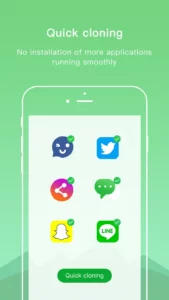
- Easy Cloning
The process of cloning system apps is easy; you must create a private space and select the apps you want to clone.
- Fast Switch
Switching between the two profiles may sound like a hard job, but with this app, you can switch spaces with only one click.
- Private Space
Create different areas for your kids, friends, and family. It’s a great way to keep your data safe without letting anybody know about it.
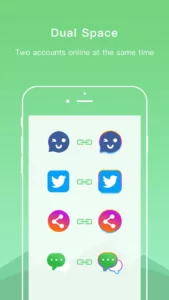
- Multiple Accounts
You can create multiple accounts on WhatsApp, install clones of Instagram to handle multiple profiles, and much more.
- Lightweight Apps
The app doesn’t consume much space or RAM on your device, and a regular android user can also install this app and enjoy all the available benefits.
How to Install Dual Space Apk?
To install the Dual Space Apk on an Android device, you must have to follow the below-mentioned steps:
- Find the download button and click on it to get the apk file.
- Click on the install button to load the package.
- Open the app and grant all permissions.
- Create a private space and select the apps that you want to clone.
- Register on the apps with different profiles or numbers.
- Enjoy the private area and have fun by hiding your data.
Final Words
Dual Space Apk is the best app to hide your multiple accounts and profiles without letting anybody know about your secret. This app supports numerous clones and private spaces for your family and friends. If you want to share your experience with the app, feel free to share your words in the comments.

Other versions:

App Gallery
8.webp)






5.webp)
8.webp)





0.webp)

7.webp)

9.webp)



3.webp)
5.webp)

6.webp)

















2.webp)
5.webp)

4.webp)

5.webp)

