Ibis Paint X
 Share
Share  Embed
Embed 


-
![]() 192
192 -
![]() 6
6 -
![]() 0
0
 192
192  6
6 
Ibis Paint X APK for Android is a powerful and versatile drawing app that allows users to create stunning digital artwork on their mobile devices. With an intuitive user interface, it offers all the tools you need to draw whatever your imagination desires – from sketching simple doodles to creating complex illustrations with multiple layers and effects.
Features of Ibis Paint X for Android
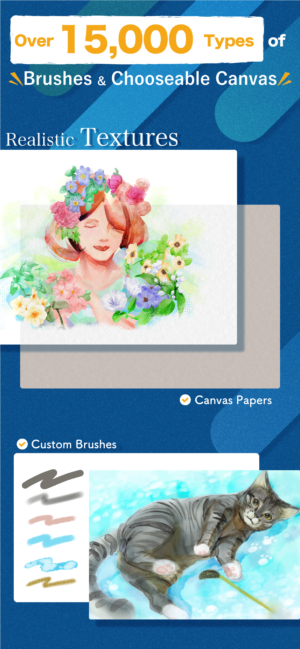
Ibis Paint X is an amazing Android app that allows you to unleash your creativity and create stunning digital art. With a wide range of features, this app offers everything from basic drawing tools to advanced editing options for creating beautiful artwork on the go. Whether you are looking for a simple sketching tool or something more complex with layers and blending effects, Ibis Paint X has it all!
- Easy-to-use drawing tools and functions, including pencils, erasers, and brushes of various sizes and shapes.
- A wide range of colour options for creating artwork with vibrant colours.
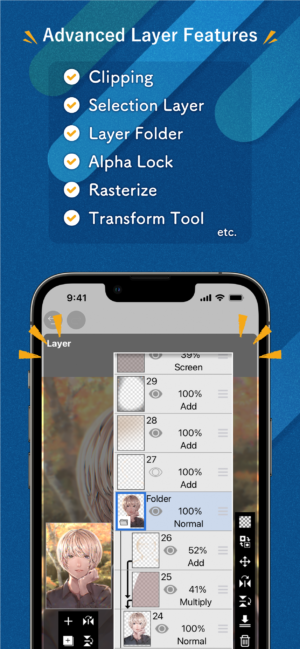
- Support for layers which can be used to create complex digital artworks.
- Ability to import images from the device’s gallery or camera roll into the app as a reference layer while painting/drawing on top of it.
- Multiple blending modes allow users to mix different types of brush strokes together in creative ways when working on their projects.
- Text tool allowing you to add text labels onto your drawings easily.
- Variety selection tools such as lasso select, magic wand etc., make it easier than ever before to select specific parts within an image quickly & accurately.
- Advanced symmetry feature enabling artists to draw symmetrical patterns across multiple axes at once automatically without having manually trace them out each time they want something mirrored over itself repeatedly.
Pros and Cons of Ibis Paint X:
Pros:
- Easy to use: Ibis Paint X is designed with a user-friendly interface that makes it easy for users of all levels to pick up and start using the app.
- Wide range of tools: The app offers an extensive selection of drawing tools, from pencils and brushes to erasers and layers. This allows artists more freedom when creating their artwork.
- Variety of features: Ibis Paint X includes several helpful features such as auto-save, customizable canvas sizes, colour palettes, adjustable brush settings, and much more.
- Social media integration: Users can easily share their creations on social networks like Twitter or Instagram directly through the app itself.
- Frequent updates: The developers are constantly updating the software so there’s always something new being added which helps keep things fresh for long-time users.
Cons:
- It is not free and requires a subscription to unlock all the features.
- The app can be quite laggy at times, making it difficult to use.
- Some users have reported bugs in the software which make using certain tools or functions impossible.
- There are limited options for customizing brushes and colours within the app itself, so you may need an external program if you want more control over your artwork’s look and feel.
- Not compatible with some older devices due to its high system requirements.
FAQs Regarding Ibis Paint X for Android.
Ibis Paint X is a popular drawing and painting app for Android devices. It offers users an array of features, including layers, brushes, text tools and more. This FAQ will help answer some commonly asked questions about the Ibis Paint X apk so you can get the most out of your experience with this powerful art tool!
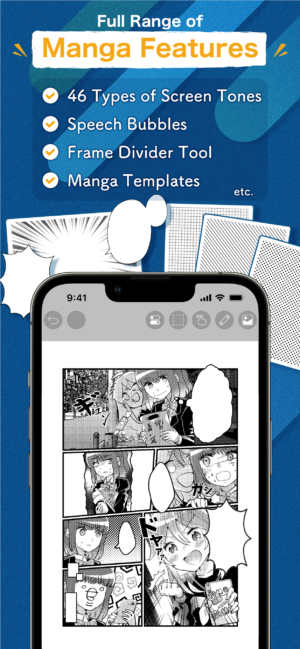
Q: What is Ibis Paint X?
A: Ibis Paint X is a digital drawing application developed by ibis mobile Inc. for iOS and Android devices. It offers an array of features to help users create high-quality artwork, including over 2500 brushes, layers with blending modes, customizable canvas sizes up to 4K resolution, advanced brush settings like texture overlays and stroke stabilization options as well as powerful post-processing effects such editing curves or colour balance adjustments.
The app also includes support for pressure-sensitive styluses from Wacom tablets so that artists can get even more out of their artwork when using the app on larger screens.
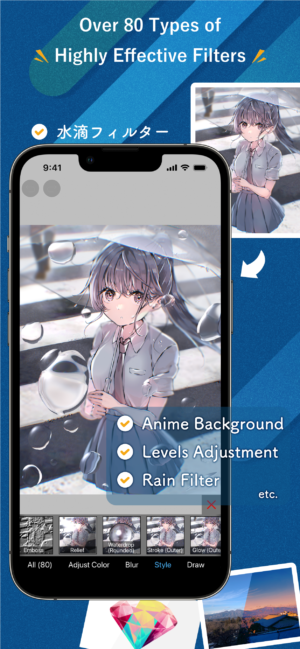
Q: How do I install Ibis Paint X Apk?
A: You can simply download the apk file from our website onto your android device. Once downloaded then tap on the Install button located on its page followed by Accepting all permissions required during the installation process if any appear before launching it once done successfully!
You may be asked whether you want notifications enabled while installing – this should not affect performance but rather provide updates regarding new content/features available within App itself which could come in handy depending upon user preferences & usage habits overall!
Conclusion:
Ibis Paint X Apk is a great app for anyone looking to create high-quality digital artwork. It offers an array of features and tools that make it easy to customize your projects, from the brush size and shape selection tool to its wide range of colour palettes. The user interface makes navigating through all these options simple as well. With Ibis Paint X you can easily express yourself with amazing art pieces in no time at all!

App Gallery
2.webp)





8.webp)








2.webp)

6.webp)






8.webp)



7.webp)







8.webp)





3.webp)