
Whats Web
 Share
Share  Embed
Embed 


-
![]() 187
187 -
![]() 6
6 -
![]() 0
0
 187
187  6
6 
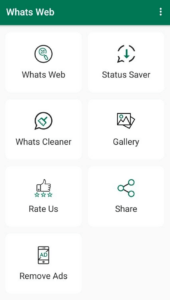
Do you want to use WhatsApp on two phones without uninstalling it from the first? The Whats Web Apk app can help with this. It lets you scan QR codes so that your account is accessible on both devices. Plus, there are lots of stickers, GIFs and background images for a more attractive chat screen!

About Whats Web Apk
Whats Web Apk lets you use your single WhatsApp account on two different devices. You only have to install this app and scan the QR Code through your original WhatsApp application, and that’s it. All the chats, groups, and call features will be available on your secondary device with the primary. You can send messages, Docx, and media files anytime, and the changes will reflect on both devices. It’s a great way to keep in touch with your WhatsApp if you have multiple smartphones.
Not only this, Whats Web Apk offers many more unique features to the users. You can improve your conversation skills by sending GIFs and stickers to your friends. Find a collection of amazing sticks in the Whats Web Apk, and with only one click, you can add the package to your WhatsApp account.
Features of Whats Web
Read the below bullet points to know more about the Whats Web Apk.
- Management Tool
It can be a helpful tool to manage your texts through multiple devices so you don’t miss any essential texts when you’re not in touch with your primary device.
- Business Leads
Handle your business through WhatsApp, schedule meetings, and send Docx and reports through any device to your friends.
- Find New Friends
If you’re bored with your current friend list, you can add more new friends with this app. It has an option to explore the nearby users and add them to have a conversation.
- Stickers Collection
Find unique stickers for moods, sad, romantic, couple-friendly, and funny meme templates.
- Save Status & Profile Picture
This app can save the other person’s profile picture and status. It will let you download the videos in high quality.
- Daily Quotes
Get a dose of daily quotes and wishes to start your day with warm wishes. Subscribe to broadcast channels for more unique services.
How to Use the Whats Web Apk?
- Install the app through the Play store or our website.
- Open the app you’ll find a QR code on the homepage of your app.
- Go to your primary WhatsApp account and click on the options icon. It’s on the top right side of the header.
- You’ll find an option called “Linked Device.”
- Click on it and hit the Link a Device button.
- Now the scanner will open, and you must scan that QR Code.
- That’s it, and now your account is available on both devices.
Final Words
Suppose you have doubts about Whats Web Apk or the installation process. Let us know about it, and we will surely guide you to solve your issues.

App Gallery
6.webp)




4.webp)






5.webp)
2.webp)





3.webp)





5.webp)









0.webp)






0.webp)
8.webp)



2.webp)


